Showing posts with label leah. Show all posts

Friday, July 25, 2014

Busy Times

It's not supposed to be busy. It's mid-summer, I should be spending time sitting on the dock, going for a swim, mowing the lawn (yeah, well... this is the country, right? But when it gets too high and ugly...), sitting in the gazebo drinking a Marguerita, enjoying the festivals and activities up here in the Highlands.


I visited my friend Janie on Kushog lake last weekend. It wasn't the greatest weather but you don't need an excuse to go down to the boat! I think this captures her in a really great moment on the lake. 

I'm doing some of that stuff, but I find myself in front of the computer for too many hours every day. There's weekly trips to Toronto, weekend visitors, stacking firewood... but I owe it to my faithful readers to post to the blog, so here I am!

I don't want to bore you
with family pictures 


...but I have to post a few! I was in Toronto last week when my son and family came to visit. There are 3 pictures I'd like to share here, if you don't mind!


Amalia is the latest addition to the family. She has bright eyes, a captivating smile and her father's dimples. She's 5 months old and the most beautiful baby in the world! 


Her big sister Leah is going to be 5 years old in a month or so. She's happy, friendly, really smart and inquisitive, and of course loves chocolate chip cookies (who doesn't??). I have a bunch of shots of her but I think this one captures her best! It goes without saying that she's the brightest, most beautiful almost-five-year-old in the world...


No doubt, my mother's going to call me when she sees this picture and say, "how could you put such a horrible picture of me up on your blog?". I know you're not smiling, Mom, but that's only because you didn't want me to take your picture! The little 'gator in the foreground is worth  a comment: most of the residents at Thorne Mills have walkers and to distinguish them, they put ribbons or flowers or something on them. Mom's had this little guy who I call "Sebastian" (family joke) for quite some time. Anyway, the picture does capture who you are, Mom!

As most of you know, I'm not a great "people" photographer, but I'm trying. I took this casual portrait of Janie at the same time as the boat shot above, I kind of like the treatment and again I think it captures her essence well.


High key portrait, with some Topaz Simplify painting effects. I love Janie's hair even though she complains about it! BTW I did NOT use Topaz ReMask on this shot because it didn't need it, but I tried the new version and it's really slick. Her hair was a challenge, Topaz handled it easily! Go to my previous blog posting for a link to the plug-in and where to get it for half-price for the next few days. Oh, OK, here's the link, and use the code "julyremask" when ordering. 

Workshops

In the last few weeks I've done a couple of different workshops. The "Stars" one had two parts to it, one a technical classroom seminar and the second part will be a field trip at Oh-Dark-Thirty (which is when the stars are out, duh...). The problem is, you can't shoot when it's cloudy. We were actually intending to go out tonight but the weather forecast changed so I cancelled it. Hopefully next weekend will be better. There's an interesting website called cleardarksky.com which has links to some 1900 observatories and observing sites in North America, with a wealth of information. Unfortunately their forecast only goes out a day or two so it's hard to plan ahead.


This was one of my classroom sessions this month. I'm willing to do more of them if anyone is interested, drop me a note and we'll see if we can work out a good date.  


This is one of the spots I picked out for the field session. As you can see, I'm facing East. There's a nice view to the North and West as well, South is not so good.  This looks like a dandy sunrise location as well, I'll check that out in the upcoming days if I can get out of bed early enough!


While we were there, we saw some cool dragonflies. I REALLY have to get a macro lens. If you see dragonflies, BE NICE! Remember, they eat mosquitoes!


People who regularly shoot macros will poo-pooh this shot because the back wings and the head are not in focus. I can do better... but this was shot with my 70-200mm lens with the 1.7x teleconverter mounted (no question about sharpness!). Handheld, 1/640 second at f/8, ISO 400.  I'm not sure of the species: I Googled it but didn't find the exact same markings anywhere. 


Don't try this at home, kiddies!

This was shot in Toronto, it was a hazy sunset, otherwise I wouldn't have pointed the camera directly at the sun.


I don't know if you can see the foreground detail on this internet version. Again, the same lens/teleconverter combination. You can ALMOST see the corona, certainly there's some detail at the edges. 

Some street photos

I'll close with some street photos I took this week. I have a tough assignment from the Minden Times to shoot what's going on in Minden: not much! It's a pretty sleepy town...


Cliff's big ole dawg is a common sight on Minden's main street. Nap time! 


These two guys were hanging out in front of the Dominion Hotel on a hot summer afternoon. I was trying to get their pictures without them noticing... I guess I failed! 


This is actually cropped from the same photo. I like the character lines in his face. The reflection of the other gentleman in the window adds balance and this shot has gathered some pretty positive comments on a few street photography forums. 

See you next week!

— 30 —


Tuesday, December 24, 2013

'tis the Season

You'd think that with everything spooling down at this time of year for the holidays, there would be more time to get things done. Just the opposite, I'm afraid. I'm playing a continuous game of catch-up!

First of all, I've been in-and-out of Toronto for some family and some medical stuff (which will hopefully work out OK, it's hard to concentrate when you have things on your mind). I had to write three newspaper columns in one day and I'm still struggling to catch up on the promises I made to the new Camera Club.

Then it snowed. My ATV's having some difficulties (the 4WD only works when I'm curving to the left. You can't plow heavy snow – with or without a rime of ice on top – without 4WD. YOU try plowing a straight driveway in curves! That said, I have it easier than my Toronto friends, some of whom are still without power since Saturday's massive ice storm (it's Tuesday as I write this), and it's supposed to go to 20 below tonight. I hope they're all finding ways to stay warm.


I shot this in Toronto on Saturday around noon, BEFORE the big ice storm.  


I said people were welcome to come up here. I have power (as I write this!) and a fireplace to keep warm. By the way, ISO 6400, the only other light a small lamp off to the right that just provided the rimlighting on my head. I painted this with Topaz Simplify. 

Family shots

It was great seeing my son, daughter-in-law and 1.75 of my grandkids last weekend (Jamie and Maria were in from New York, with Leah and a new little one due in about 6 weeks!). I only took a few pictures, Leah wouldn't hold still for a second and refused to pose for pictures, so I grabbed what I could.


Nothing does my 92-year old mother's heart more good than a visit from her great-grandchildren. Simple North-facing window lighting. 


It was hard to choose which image of Leah to use. I kept hitting "Pick" as I went through them. I've always said you can't take a bad picture of your kids! I chose this one because of her expression, and included her favourite "Princess" doll.  

Back Home


I said we got snow up here, not ice. This will give you some idea. There was about a foot of fresh white stuff, more after I shot this, and more to come tonight!  


I did venture out with the camera and took a few shots across the lake. But I've shot so many of these, I thought I'd try to make it a bit different, so I painted and textured this sunset shot. By the way, that's not open water, just darker ice. Certainly not enough to walk on yet, let alone drag ice-fishing huts out! 


Again, I have a lot of pictures of the Red Umbrella Inn, so I painted this one to make it a bit different. It's a 3-shot HDR, rendered with Nik HDR Efex Pro 2, then painted with Topaz Simplify.

You may have noticed the grey drop-shadow framing on some of these images. I'm experimenting with how to present my pictures better online. Please let me know if you have a better idea!

Weekly Blog

My goal is to blog once/week. This is #45 for 2013 (I had exactly 52 in 2012, and 48 in 2011). So there will be one more, #46, but I also wrote 6 technical blogs on the other site this year, that I'm going to count, so that adds up to 52! Let's see what 2014 brings!

— 30 —

Wednesday, April 21, 2010

Trying some new stuff

It’s been a busy time, or actually a make-busy time the past couple of weeks. Business is slow (not just me – the people I talk to in the First Aid industry agree) so I’ve had to spend a lot of time working on making it recover. Adding new products, cleaning up the ones I offer now, working on marketing channels, etc. So I haven’t spent as much time as I’d like on photography.
So if you want to help, you must know people who need really good First Aid kits because the ones we make are Outstanding. If you know someone who has a business, the law requires that they have one but anyone with a home or car or kids or dogs… What about a little kit for photographers? Fits in your camera bag and I’ll put extra sterile gauze pads inside to use wiping down your camera stuff! Go to the FAC First Aid website or email me and I’ll take care of you or your contacts!
Photographically, it’s been an interesting few weeks. I have a bunch of pictures to show you, which might give you some ideas or send you exploring in some new directions. I did some stuff I'm not that used to.

What I tried was (a) using natural light, (b) HDR techniques and (c) shooting birds with the long lens.

I took some shots of my kids and grandkids the other day, using only natural light. I think the best light in the world is what comes through a North-facing window (OK, one shot was at an East-facing window and I don’t see much difference!)

Facing the window. My newest granddaughter Leah

Leah's mom, Maria. She's facing the window, but I'm off to the side. I love this lighting!

Kelly's quartering into the light. Now you don't need to soften the skin on a 6 year old but look how mellow it makes the image!

This picture of Ryan at a chess board made me think about a picture I DIDN’T take last week. I was out for coffee with a friend and noticed a young couple sitting in the coffee shop playing chess. There was such a feeling of intimacy between them and I really wanted to capture that picture but I didn’t because I didn’t want to intrude and because I’m generally shy about asking people if I can shoot them. For two days, I’ve been picturing that shot and regretting that I didn’t get it. So I resolve to try harder to step out of my comfort zone in future. That’s what I meant about exploring new directions. Am I making any sense?

A phone call from a journalist at Sun Media set me going in another direction. This had to do with marketing my First Aid products but in the end he asked me for a product shot which wasn’t in my archives. Well it is Spring, and it’s time to set up my studio which has been parked for the winter! The garage isn’t heated, you see… anyway it spurred me to set it up again to take a couple of product shots.


This is the finished shot.


I took it on the white light tent background but I created a background and added a twist: the helmet is an HDR image. OK, I need to explain that! HDR is a technique that allows a wider than normal range of light levels to be displayed in a photo. It stands for “High Dynamic Range”. You can do it with as little as 2 exposures, one light and one dark and combining them in an appropriate way.

You can even use one picture, if you shoot in RAW because you can adjust the exposure to show details in the shadows and use a second copy of the image where the details in the highlights are shown, then mix the two. There are a bunch of different software packages out there to achieve this, but the benchmark is Photomatix Pro.

Anyway, look at the motorcycle helmet in the picture. Go ahead, click on it to blow it up. Amazing how detailed it is, isn’t it? I didn’t want to do the whole picture that way, so I just stripped in the HDR expanded helmet on a new layer and left the rest of it the way it was exposed in the light tent. The helmet is a combination of 5 different exposures. So in this case I used HDR techniques on PART of a picture.

But even Photomatix doesn’t go far enough sometimes, so there are additional programs like Topaz Adjust 4 which can provide some interesting effects. Thanks to Lance for pointing me in that direction!


This is my outdoor/motorcycle First Aid kit. The helmet is in the shot to give it a sense of size. By the way, there is no table, no reflection: shot in the white tent and everything created! Click on it to blow it up.
I really got interested in HDR’s and the more extreme effects in Topaz (which is a Photoshop plug-in, by the way). Here’s a variety of shots handled in different ways but all HDR.


Some people think this is what HDR is all about. Just look at the detail! The colour depth, the sharpness...

And this is completely different! Textures, motion... this is a false HDR, created from only one image, and two separate treatments on the car and the background in Topaz. Blow this one up. It looks best when viewed big.
...or this cartoon-like treatment with super saturated colours

This is more of a pure HDR expansion of the range of light at dawn. I chose not to expand the shadow areas, the cloud and the reflections in the water are the point of this shot. Here's a case where (I think) the horizon line should be in the centre of the image to give equal importance to the sky and the reflection.
Except for the police car image, I used 5 exposures for each of these shots: ranging from 2 stops underexposed to two stops over. The D300 will do that automatically. The software will compensate for some of the variations when handholding but the best results come from tripod mounting the camera and shooting with precision.

So I'm really taken with the potential of HDR photography. It's going to be hard not to use it all the time!

When Dr. Ron was up here, we drove past an empty osprey nest. I know where there are several of them in the Balsam Lake area. Driving up the other day, I saw that the ospreys are back! I loaded the 400mm lens and learned how difficult it really is to shoot birds on the wing with a long lens. First of all, there’s trying to find it in the viewfinder. Then there’s focus, which is really critical! I ended up shooting about 150 frames and only got about 6 in focus! Autofocus is way too slow, and manual is, well, tough!

Here’s an out-of-focus or at least motion blurred shot of a Canada Goose which I kind of like the dynamic of anyway:


And here’s a picture of an Osprey in flight that actually worked:


I got one shot of it coming in to land at its nest but… out of focus! So I decided to unlimber my painting tools and give it a shot.


Everything you see is created. There is no original photo in this image. I sketched on new blank layers as if I laid tracing paper over the image, then discarded the original image (which was out of focus anyway!). Topaz provided some enhanced colours on the bird and the Photoshop Texturizer provided the canvas. This was done in Photoshop, not Painter 11.
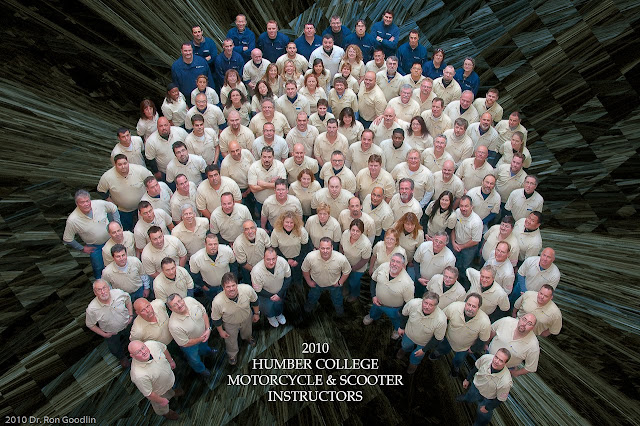
One more picture. This one isn’t mine, but I “art directed” it. Every year I shoot the instructor group picture at Humber College but this year I wanted to make it a bit different. So I invited Dr. Ron to come shoot it and we gave the picture to John Kerns to postprocess. He’s really creative with Photoshop effects. I gave both of them totally free rein: I only told Ron how I wanted to arrange the people in the shot, where to shoot from, what lens to use, what lighting, otherwise he was on his own! Same thing with John! Just kidding. What do you think? Did these guys do a great job, or what!


Well, tomorrow I get my new motorcycle, instructing season starts next week, I'm planning my vacation trip to Newfoundland, the sun is shining, the grass is turning green... trilliums are two weeks away, it's a new season, new beginnings. See y'all!

Thursday, December 03, 2009

It's not "IF", it's "WHEN"

Did you miss me? It's been a while since I posted, but as you might have guessed from the title, I suffered a computer crash. My other excuses involve some medical issues and some work stuff that's kept me busy for the past couple of weeks. So not only haven't I posted anything, I've hardly pushed a shuitter release in the last month. I do have a couple of things to talk about and show you, though.

So in today's post, I'll talk about being prepared for that big day when your computer crashes, share some new purchases with you and show you a few images. Fair enough? Let's get going!

When your computer crashes.
As I said above, it is inevitable. Your computer is going to crash. Everybody pretends it only happens to someone else, never to you, but ignoring the fact that it WILL crash isn't smart. You have to be prepared.

I lost zero data. None. But then the computer that I use most of the time wasn't the one that crashed, it was my old desktop. I brought it up North about a month ago. The other day I walked into my computer room (OK, my third bedroom/office) and booted the machine, or tried to, because my scanner was hooked up to it. "Blue Screen of Death". Then nothing: "please insert a boot disk...". The hard drive was toast. My computer guy (Bob, the Greek Geek. He's really good: contact him or check out his website and be sure to tell him I sent you!) had a look at it and told me it wasn't worth fixing. Hardware + labour > new. Besides, it was an old P4 system and not worth it.

So I bought a new machine. The best deal I found was an HP bundle at Costco: a quad core system with 8Gb of RAM, a 750Gb hard drive, a 25" high resolution monitor and Windows 7, all for under $1000.

Now even though I didn't lose any data, I've spent the better part of 40 hours getting this thing up to speed. Configuring it (thanks, Jim — I don't what I would have done without your help!), installing basic software, then physically installing it up North. I discovered that my wireless stick won't work, so I can't get it online until I hit Tiger Direct and get another one tomorrow, and my attempt at networking it with my laptop using my old router was fruitless. Windows 7 seems to work OK, but I haven't spent enough time learning how to take advantage of some of the new stuff. I will eventually.

Imagine how much more painful this would have been if I had lost data. Imagine yourself losing your computer. What about your emails? How about your address book? All your passwords and accounts and favourites. Your accounting and banking information. Your documents. Your photos... are you backed up?

I don't have the world's best backup system. Far from it. But what I do have, saved my bacon. So I'm going to suggest you might want to consider doing something similar. There are two parts to the backup, the data and the programs. I did not have the programs backed up and to tell you the truth, I don't really know how. I know it can be done: people talk about "ghosting" a drive or creating a system backup. I ran one yesterday on my laptop (a system backup). It took almost 12 hours to do, but it worked away in the background while I did other stuff.. I tried to do the new system too, creating a set of System recovery DVD's, but my DVD drive doesn't like my disks, apparently (it works, though -- I did copy some data onto a DVD). So I would have saved several dozen hours if I had done a system backup on the other machine — not really, though because who needs to save old Photoshop CS2, or my XP operating system? Or Office 2003?

Anyway, let's talk about something easier: backing up your data. First thing you need is something to back it up onto. DVD's are not OK. They degrade with time and are not totally reliable anyway. What you need is an external hard drive (Jim, I know, not good enough for those who use DROBO systems and multiple redundant backups, but I'm talking to folks like me who don't really have those extreme needs). Here's the drive I have: go buy yourself one for Christmas. It's only $109 at B&H. It's a Western Digital MyBook USB drive and it holds 1Tb (that's 1000 Gb!) of data. Click here to see the specs and you can order it at B&H, probably the most reliable place to buy stuff.

How do you do the backup? Couldn't be easier. Plug the drive into a USB port on your computer, and into power, then drag your entire "My Documents" folder onto it. Be careful not to just drag the shortcut, you need the whole folder. Open it, then back up a level to see the folder itself. My 'Documents' folder is almost 3Gb in size. That's only 0.3% of that 1Tb drive! Once it's there, rename it so that you know what date it was. Next time you do a backup, keep this one and give the new backup a fresh name. Because you have such a nice big backup drive, you don't need to delete it, but I generally delete the third one back, just to keep things clean.

Not finished. If you have Vista or Windows 7, your pictures are not in this folder! You need to do the same thing with your pictures folder. Am I making any sense? Here comes the hard part: your address book and your emails! They are likely not in the Documents folder. You need to open your email client (I use Outlook  2007, for instance) and locate where the data is stored. In Outlook, click on Data File management under the File tab, and it should tell you where the files are. Mine is at C:\Users\faczen\AppData\Local\Microsoft\Outlook. Or you could just search for *.pst. Once you find it, drag a copy (Outlook has to be closed) to your backup drive. Do the same thing with your "Favourites" list in your web browser. Now you're done.

So if your computer crashes, and you fix it or get a new one, you can plug the external drive in and copy all that stuff back into the machine. How often you do a backup is up to you: I do a full backup every month, plus I keep critical stuff in other places, like my active database and my QuickBooks files. I copy those every night to a USB flash drive and often to my backup drive and other computer. I'd be dead in the water without this data.

OK, I've rambled on enough about doing backups. You know you have to. If you haven't done one recently, stop reading this and get going. You'll be sorry if you don't, when (not if) your computer crashes.

I bought a Kenko Telextender.
Against my better judgement. I really wanted the Nikon TC-17e which is a 1.7x extender, but they're over $400. The jury is still out about the Kenko one. It's a 2x extender and yes, autofocusing works on my 70-200 lens. It does help you reach out and touch stuff, but I'm not convinced it's terribly sharp. I'll do some more testing, but here's a shot that shows what it does:


This paddle was over 100m away. This is the full frame image, cropped only slightly, reduced in size to make it manageable to post here. It was shot at 1/2000 second, f/11, ISO =800. On a tripod.

Here's another shot, comparing images with- and without the extender.


The main picture was taken without the extender, lens zoomed to 200mm. ISO=800, exposure = f/5.6 @ 1/2500 sec. The inset on the right is blown up out of this image. The inset on the left comes from the same shot taken with the 400mm (200mm x 2) at exactly the same settings.

There is a clear quality difference between the two shots: by virtue of the fact that the crop was bigger on the 400mm image. Not a great test, but it shows that there is a place for this converter in my camera bag. It was quite inexpensive, roughly 1/4 the price of the Nikon. BTW, I can't shoot pictures with this thing worth a damn without a tripod.

I'll take some more comparison shots later. There weren't any birds around today to shoot!

If you want to see and/or buy these telextenders, click here:
I promised you some images
Well I have two groups of photos to show you today.First, I got interested in shooting star trails. I set the camera up at about 1am and left the shutter open for a good hour, plus.


The top image is the original. The others are the same shot, manipulated a bit. The exposure was 3816 seconds (63 minutes) at f/8, ISO 400. Lens was my 24-120, set at 24mm.


These two images are "as shot" and with some extra noise reduction. Exposure was 4209 seconds (70 minutes) at f/10, ISO=200. For noise reduction, I used the "median" filter at a moderate level (9 px) on a new layer. I changed the blend mode to 'overlay' and reduced the opacity of the layer to about half, then used curves to bring the brightness back. Note the softness in the tree branches.

The D300 has some amazing noise reduction algorithms built in. I just found out how it works: the camera creates a second image with exactly the same duration as the original -- so this shot actually took almost 3 hours before i could see it. It mixes the two images together, subtracting any noise generated by the sensor. The colour of the image is a mystery. There's no light pollution in the direction I shot, so I don't really understand why the image is yellow. Someone suggested it's a white balance issue. The camera was on auto WB, and it selected a colour temperature of 4150K.

Here's another neat shot


 Exposure was 4915 seconds (82 minutes) at f/10, ISO=200


Here's another kind of star shot. It's Orion's Belt. This was shot at f/1.8 using my 50mm prime lens,
for 10 seconds at ISO=1600.

Let me leave you with a couple of family images. There's one of Maria, my daughter-in-law and one of my mother, both with my new granddaughter Leah. I selectively reduced the clarity slider on my mom's face, but otherwise, the pictures are pretty well as shot!


Enjoy!

Wednesday, September 16, 2009

Leah Elsa Torres Springer


Born September 15, 2009 at 11:59pm in New York.
Proud parents: Jamie and Maria Torres Springer
Proud grandfather: me!

Quick sketch done from the really terrible no-flash cellphone photo Jamie took moments after her birth.