Wednesday, October 27, 2010

Workshops, workshops, upgrades

Did you miss me? Believe it or not, I’ve been too busy with other photo stuff to blog. OK, and with work and life in general... anyway, I’m back.


So first, let me tell you about the Kelby workshop I attended last Friday.

Photoshop CS5 for Photographers, presented by Ben Willmore from NAPP (Kelby Training)

Negatives:

• it was at the Metro Toronto Convention Centre where parking is at a premium, it took almost 2 hours to drive there (and the same amount of time homeward bound).

• They ran out of coffee. THEY RAN OUT OF COFFEE. When we got there, all they had was de-caf. They brought in more coffee for the morning break and promptly ran out again, never to replenish it.

• No food facilities there. I knew that and brought my own lunch, but a lot of people didn’t.

• I think Ben was wearing the same hat he wore 2 years ago.
Positives:

• The seminar was really directed toward photographers as billed. Unlike the Corey Barker session last year which had limited application for anyone but graphic artists. That said, that’s what they said it was going to be.

• There’s lots of neat stuff in CS5 and Ben knows how to pass that info along.

• By the end of the session, I could already see how to improve my workflow

• There weren’t really any vendors there selling stuff, so I made it out with my wallet intact.

You need to be practiced in Photoshop to get something out of the seminar. There was an evaluation form we filled out, with a check box asking if you thought you were a novice, intermediate or expert at Photoshop. I selected "intermediate" but in hindsight, I've sold myself short. I've actually used and are familiar with pretty well all of the techniques Ben showed us, with the possible exception of "Puppet Warping". I left the seminar wondering how much I had really gotten out of it, but I realized that I did get two things: validation that I was on the right track, and some insights into ways to improve my workflow.

Ben did not spend any time on Photoshop basics. That's what I meant above: it's not a grass roots course, so if you're not comfortable in Photoshop, you'll be frustrated because you won't know how to achieve the results that Ben did. He did spend a lot of time on Adobe Camera Raw, which he uses from within Bridge but it's the same as the engine in Lightroom.

The focus was on the new stuff in CS5 — the HDR engine, content-aware fill, fine selection, lens correction and yes, puppet warping.

If you really want to get up to speed in Photoshop CS5, buy Scott Kelby's book. It's well worth it and as I said a hundred times already, so is a NAPP membership. Click the link at right.

Upgrading to Lightroom 3

That was time consuming. Why? Because I didn't listen to Jim in the first place. My images were scattered all over the place — on 4 different hard drives, in various places. Before I did the upgrade, I reorganized my images and this time I listened to Jim and did the shuffling all from within Lightroom. I now have my master photo archive on a 2Tb external drive (the drive letter is "M". I think I'll call it "Mother"). The LR catalog itself is on the internal drive in the desktop and there's a backup on Mother. Most of the photos themselves are backed up on my other external drive but I still need to reorganize that.

I'm not going to talk much about LR3 here and now: let me get used to it first. Import and Export are different and I had to rebuild things, there are a few neat and sneaky new things like lens corrections and one really really neat thing called tethered shooting which I'll save for another day.

Suffice it to say that the upgrade was lengthy and had to be thought out well, and it ain't over. I still have to figure out how to replicate the settings I've created on the laptop.

I’m off to another workshop

I decided that since I hadn't had a vacation this summer (there are those who may argue that my whole life up here in the Highlands is one big vacation...), I deserved one. So when Rob Stimpson sent a reminder out about the Gales of November workshop up in Wawa, I jumped at it. I’m going, next week. So is Dr. Ron – I convinced him to come too! Go to the website to check it out, and don’t be jealous...


I haven't taken a lot of pictures. So without further ado... these are 3 images from a rainy Sunday afternoon walk. One of these days I'm going to try to publish images just the way they came out of the camera. Well, maybe not today...

Pine Sentries
In some places, pine trees grow in straight lines. I had added some (white) post-crop vignetting to this image, but on second thought, didn't like it and removed it.
Saturation
The rain produces saturated colours. So does pixel processing in CS5, Topaz and LR3! I did an HDR of the same image and it's not as crisp as this one is.


Late Autumn field.
Across the road behind my house. Some painting effects.

I bought a new toy. It should be waiting for me at my mailbox when I get there tomorrow. I'm not going to tell you what it is, I'll save that for next time... stay tuned!

Wednesday, October 06, 2010

Fall Colours 2010 has come and gone!

And a great success it was! First thanks go to the creator of the fine weather we had: it was a little cool, but we had awesome sunrises and pretty good sunsets as well. I have to admit, though, that the sunset on Monday after everyone except me had left, was the best.

We were a "Group of 6". A good number because I was able to seat everyone at the table easily, we could look at our photos on my monitors without trouble, and everyone had a place to plug in their computers. Thanks for the great zucchini dish, Shannon (and the recipe), Kathy for the pies (which weren't baked, we didn't know that but caught it in time!), Bernie and Josie for their insights and Liz for a breath of fresh air!

I have some images from everyone to post on the photography.to site, as soon as we get the formalities out of the way. In the meantime, I see that Shannon put up a blog posting with a few of her images, here: http://shannonlafferty.blogspot.com/. I LOVE the first image she posted. I wrote that I wished that when I grow up, I could be like her!


A few of the venues I selected. I showed this map and some others like it on Friday night in a PowerPoint I created outlining what I was hoping to accomplish during the weekend. Although there was a teaching element to it, all of the participants were experienced and excellent photographers so I didn't want to create a rigid atmosphere. My intention was just to plant some seeds, and let the individuals make them grow in whatever direction they wanted.

My intent was to go out on Saturday and shoot images by following the "rules". Everyone did. Then on Sunday, I told people to go ahead and BREAK the rules. I don't know yet if anyone did and if they were successful. We'll see when they send me some images! I did, though:

Notice how your eye goes to the 'window' which is the brightest spot in the image, and which is centred left-to-right? But if you stay with the picture for a while, you look at the texture of the ceiling, which is really the focus of the picture. I broke the rules, just to see if it would work. Did it?

By the way, I'm enamoured with HDR and Topaz-enhanced images. This was also a hand-held multiple exposure (breaking another rule, about using a tripod!) and I set the edge glow quite high. The tree is centred in the window. How many other rules did I break?

In the same location (my neighbour's old barn), where Liz and I went to shoot for a bit on Sunday afternoon, I got what I consider my best "art" shot of the weekend:

This is cropped from a larger image. I call it "Chain, Chain, Chain". The motion blur is due to the slow shutter speed, and no tripod again. Breaking the rules!

I said we got some good sunrises ( see Shannon's blog for the best shots of the group, in my opinion). I did my crazy HDR thing...


...but I also got a few more conventional images which you can see on my Smugmug Gallery here. I took a couple of good 'people' pictures, especially of Liz, one of which is here:


I enhanced the eyes in Photoshop, and softened the image by reducing the clarity in Lightroom, that's about it. I deliberately didn't crop this one too tight because I wanted to show her as a photographer.
I mentioned the Monday night sunset. I was chainsawing down some rose bushes (hope they come back next year!) and turned around to see the most AWESOME sky I've seen in a while. I dropped the chainsaw (which cost me at least 45 minutes reinstalling the chain that came off the track!), grabbed the camera with whatever lens happened to be on it (the 12-24mm wide angle) and ran behind the Red Umbrella Inn to try to get a few shots before it went away.


I took this picture of the Inn as I was running out there. Not an HDR or anything, this is what it really looked like! "The Sky is on Fire!" .
Then I took a series of shots, all hand-held (no tripod: I told you, I RAN out to get there before the sky changed!). It's hard to choose my favourite, but this ranks up there:


All of the participants said they'd like to come back again. I'm still waiting for more feedback which will guide me in future workshops, and I'm planning to do more of them. Email me if you want me to send you details when I design the next one.

Friday, October 01, 2010

Fall Foliage 2010 is here!

People will start arriving in about an hour! Here's hoping for some decent weather.

I got up early this morning and made these images:


Both of these images are 5-shot HDR's but the first one was created in Photoshop CS5 and the second one with Photomatix Pro. Both were tweaked with Topaz Adjust. I was disappointed with the dawn light and drove away: then came back when I saw the sun on the hills in the distance!

Wednesday, September 22, 2010

Getting Ready for Fall Foliage 2010!

In about 10 days, we're having our Fall Foliage 2010 workshop! I'm having fun preparing for it, from logistics to curriculum. It's turned into a smaller group than I had hoped, but if the numbers hold, we can call ourselves "The Group of Seven". Catchy, no?

It's a well-known fact that the best way to learn something is to teach it to someone else. One of the exercises we're doing is "Follow the Rules". So I guess I have to know what the rules are! So when I went out to shoot a few pictures, I deliberately paid attention to them. Interesting results.

Oh, in case you think our workshop will be rigid and directed, another exercise is "Break the Rules". Should be fun. Check out the photography.to website.

Anyway, I went out and found some great venues, I got permission for us to shoot on several private properties, and to top it off, I found out there are a couple of events going on in Haliburton that weekend. The leaves should be peaking... even if you can only make it up for the day, come on up and get some killer shots! Email me if you're thinking of coming.

Stuck in a rut?

I am. I noticed that most of my images in the last weeks have one thing in common: they're extreme. Extreme colours, oversaturated, wild textures. HDR's. Topaz enhancements. Take this shot for example:


Afternoon Sun
Sunset on Horseshoe Lake. This is a 5-shot HDR with some Topaz enhancement. I masked the sky and the left hand chair and used a different adjustment. I painted on the mask to bring out the texture and colour of the wooden dock.

I looked at a regular exposure of the same scene, but it looked boring to me. I'm really hooked on the detail and textures possible using these techniques.

So I tried a couple of other things I haven't done for a while. For example, an abstract::


Autumn Patterns
Tight detail from a slow shutter speed zoom of some mixed fall foliage.
I was shooting the chair picture above and had changed to the big 70-200 lens for some sunset shots. Then I looked at the house behind me and wanted to record an architectural shot. Wrong lens: I couldn't back up enough to get it all in and was too lazy to change lenses. I remembered reading that Adobe had improved their photo stitching algorithms in CS5, so I thought I'd give it a try.


CS5 is amazing! I took 6 images, 3 left-to-right of the top of the house, then 3 right-to-left of the bottom. I clicked "create Panorama in CS5" and voila! I can't pick out where the seams are, can you?

This is the original merge, but I added a red background layer so
you can see what I did.

And here's the final image after cropping and straightening. I dodged some bright spots and warmed it up a bit, but that's all. Needs a bit more 'air' above the house, though. The finished image is over 11,000 pixels wide!


Non-Photography item

My sister put me onto a device/service called MagicJack. I've tried Voice-over-IP system before — with an adapter between the modem and the DSL line or cable connection. The old system caused all kinds of problems, sound quality was lousy and it was unreliable.

Looks like things have come a long way. This unit plugs into a USB port, you plug a phone into it (or a headset into the computer) and it works! I've only had it a couple of days, but already saved money because I can now phone the US for free.

It's supposed to be only $39.95 (apparently less if you buy it at an "As Seen on TV" store) but in the end, it cost me about $60 because I had to pay duty when it came in and because they want $10 for a Canadian phone number. It works, though. Check it out — Google MagicJack.

Next time, I should be able to comment on Lightroom 3 which I've been trying to find the time to install, and maybe I'll show you some "back to basics" type images, no HDR, no fancy stuff. We'll see...

Tuesday, September 14, 2010

October 2/3 Workshop update

News Flash! There's an event in Haliburton the weekend we're up there worth photographing!

Colourfest 2010 is happening in Haliburton Village on the Saturday. Here's what they have to say about it:

I plan to incorporate it into our program, for those who wish to go. We were intending to be in Haliburton Village (or Minden or Dorset) around mid-day anyway, so we can extend that a bit and delay the whitewater segment until later in the afternoon, or move it to the Sunday.
On Saturday, October 2nd the village of Haliburton comes alive with vibrantly coloured street displays -- scarecrows, pumpkins, corn stalks, mums -- continuous entertainment, a bigger-than-ever Vintage Car Display & Parade, "Spectacular Colours" bus ride to Skyline Park, Kids' Colour Splash create-a-mural presented by the Rails End Gallery's "Art Attack," clowns, buskers, contests, prizes, a corn roast and so much more! Plus, Colourfest's Pancake Breakfast...a delicious way to start your day at Haliburton United Church from 8 to 11. Colourfest 2010 Haliburton Village Saturday October 2nd 10:00 a.m. to 4:00 p.m.


Several people have already signed up for this Workshop, but there's room for more! Hurry if you want to find accommodations, though. Go here --> http://www.photography.to/ to sign up.

  • I have a question. Are there people who would just like to come up for the day, Saturday or Sunday, and join us shooting at some of the venues I've chosen? You'll likely miss the dawn and dusk shoots, etc; remember, it's a 2-hour plus drive from Toronto. If there's enough interest, I'll structure something for you. Send me an email if this interests you.
More on the HDR issue raised the other day:

Photomatix Pro and Photoshop CS5 are really different in the way they handle HDR merges. Some pictures are easier to do in CS5 -- but I haven't yet identified which ones they are! Things like contrasty metallic objects, I think. But landscapes and subtle skies -- forget it (unless I just haven't found the formula yet).

The following 2 images were shot at dawn off a 10th floor balcony facing North. Neither one is worth writing home about. I did a 5-shot bracketed series, with the nominal value being an exposure for the sky (probably a mistake, since there likely wasn't enough range to expose the buildings correctly). Then I processed the images by merging them into HDR's using CS5 and again using Photomatix. I used the same original 5 exposures.


The picture above was merged in Photoshop CS5
The picture below was done with Photomatix Pro


The CS5 one required a TON of fiddling and mussing around with curves, gamma, detail level, etc. Photomatix took 2 minutes. I was looking for some extreme effects: CS5 didn't give me any.

But as I said, I posted some vehicle pictures earlier that worked really well in CS5. The jury is still out.

Did you ever look up just after sunset at the deep blue indigo sky, with brilliant red saturated colours touching the earth and say, "I wish I could capture that"? But you can't. That's a sight you have to experience in person, something that film or a digital sensor can't reach.

You can't do it with HDR either, but you can try. When I look at this image I can almost imagine being there. A 5-shot bracketed set of exposures, rendered in HDR via Photomatix. I used a graduated screen to desaturate the building lights and marginally change their hue a bit. Post-crop vignetting adds to the rich feeling. I'm sure it's oversaturated, but it looks good on my laptop!

Saturday, September 11, 2010

"Fall Colours 2010" is a GO!

OK, we're on. October 2/3, 2010 at my place up on 12 mile lake. Come join us!

As I write this, I know there are at least 6 or 8 people coming up, and I know there'll be more. I'm billing it as a "workshop" but it's really an opportunity to shoot the awesome fall colours in the Ontario Highlands, in the company of, and under the guidance of, other photographers.


Here's one of the locations I found to shoot at sunset. By the way, if you're a fisher(man), the fish were jumping all around me while I shot this image! Smallmouth Bass, I think.
Hurry, hurry, hurry! Accommodations are going to be scarce if you wait too long!


Go here for more information: http://www.photography.to/

Photomatix or CS5 to create HDR's?

They each have their strengths. Photomatix Pro gives you much more range of adjustment of effects and colours; CS5 handles image alignment much better. I'll experiment more later, but in the meantime...


"By the Dawn's Early Light"

I took this image from the 10th floor of my mother's building, looking WESTWARD at the construction site next door at DAWN. Yes, you read that right: the sunrise was BEHIND me.  Photomatix did a great job enhancing the colours (and I added a little Topaz Adjust for the detail and other effects), but the alignment between the 5 handheld exposures was less than perfect.

I was actually intending a photo that shows the whole crane from top to bottom, but I like this crop much better because the full frame looks too cluttered to me.

Thursday, August 26, 2010

Shooting with a bunch of pro's is inspiring!

And at the same time, sobering. It makes you recognize your shortcomings and makes you wonder if you really do measure up! (there's room here for comments, folks. Leave a note telling me how talented and wonderful I am, and I'll be forever grateful to you for stroking my ego!)

  • I don't have the technical expertise that Jim Camelford has
  • My vision and creativity is nowhere near that of Ron Goodlin
  • Alex and Fern showed me that the viewpoint of people who are still relatively new and not afraid to explore concepts and try new things can be inspiring. It's fun to watch people grow!
  • John and Mary showed a diligent attention to detail
  • Kathy is incredibly tenacious and won't give up until she gets the shot she wants, and
  • The more I see Lance Gitter at work, the more I realize how I am a mere grasshopper. He has ALL of the qualities I listed for the other people above. Lance, lying on the tarmac at the airport to get that shot of the Harvard Trainer with a full reflection in a puddle was (a) an example of how far you have to go to get the best image, (b) a sign that sometimes you have to think outside the box and (c) inspiring, because I'm going to try to be less lazy and get some of those killer shots too!

Enough kudo's. Where I'm pretty good is at creating post-processed images, but you need good original shots to work from and that's what I'm going to work ON. The opportunity to go out and shoot with other people and learn from them is invaluable.

As you may have surmised from the above, I spent a few days on what I would loosely call a "workshop" ('Expedition' and 'Safari' don't do it. Is there a more appropriate word?) down along the North Shore of Lake Erie. Thanks to Kathy for her work arranging everything and to Jim for his incredible hospitality, even while worried about Jen in the hospital, and to everyone else, well just for being there!

Here are a few shots I took on the trip. There are some more on my Smugmug site (they start here), but these are the ones I like best for now (haven't had a chance to look at everything! There may be more...)


We met this guy sitting in a chair in a park in Dunnville. He claims to be a well known political activist through the '80s, that he's been arrested 10 times, that he's well known to agencies like CSIS, the CIA and the FBI... anyway, he's incredibly articulate and, some of us think, would make a great subject for a TV documentary. His name is Ken Hancock, but Google doesn't have much on him.


These two images illustrate the difference when you add an interesting person to a landscape shot. I find the second image, with Alex Ney in it (thanks for posing, Alex!) to be far more interesting than the ordinary landscape. I should have taken a little extra time to use a flash fill, but I managed to make do with Lightroom and Photoshop. Both photos were taken on the shore of Lake Erie at sunset, near Jim's cottage.


This image was taken at the Dunnville Airport, which houses the RCAF Museum that specializes in the Yale and the better know Harvard trainers. I daresay virtually all RCAF pilots from WWII onward trained in one of these. A couple of planes flew in from nearby Tillsonburg to wait out some bad weather. It's interesting that I happened to click on the first website after googling "Harvard Trainer" and came across this illustration. Plane #46 is mounted on a hard display stand at Dunnville. Plane #47 was one of the two that flew in! This is, of course, an HDR enhanced image, with further processing in Photoshop using Topaz Adjust.


We went to a place called "Cottonwood Estates" where people dressed up in 19th Century costume and the house was restored to the splendour of the mid-19th century. I was decidedly NOT inspired to photograph inside (not my thing. Too much clutter, I didn't see any way to isolate subjects). I did, however, shoot this exterior shot as an HDR, then I used Topaz to simplify and smooth it (as opposed to my usual enhancement of details). I shot with the 12mm wide angle lens, then used a perspective crop in Photoshop to square up the building.

Announcement: we're going to do something up in the Haliburton Highlands on the weekend of October 2, 2010. It should be about the best time to shoot leaves and autumn outdoor shots and we're going to make a workshop out of it. I'll send out more information soon, but if you are thinking you might like to attend, send me an email.

Monday, August 16, 2010

I Love Thunderstorms!

I said that before. About a month ago. At the time I said I remembered having a multiple-lightning-hit phot from years ago and that I'd post it here when I find it. I will: I just haven't found it yet.

But last night, there was a thunderstorm. There was a lot of lightning going on, but not right overhead. It was a really active storm, but the lightning was cloud-to-cloud, not cloud-to-ground. The storm centre had passed and it wasn't raining that hard. OK, I grabbed the camera, the tripod, an umbrella and headed out into the back yard.

Without further ado, here's what I got:


This is a 5-shot multiple exposure taken over the course of about 5 minutes. Any time the shutter was open for more than 15 seconds, I had to wait the same length of time for the noise-reduction process to complete. Frustrating, because I wanted to press the button again!

If you want to try this at home, here's what to do. This is for a nighttime shoot: all the numbers go out the window if you're shooting during the day. I think it's do-able, but you'll have to experiment to avoid light polluting your images.

The setup
  • You need a tripod. Ideally you should also have a shutter release cable (mine was in the house, but I wasn't going to leave the camera out in the rain without an umbrella to go get it!).
  • Find a spot where your camera isn't going to get rained on or take a chance and use an umbrella.
  • Use a relatively wide angle lens. You don't know where the lightning is going to be and it's good to include something other than sky in the shot. Find a way to focus on infinity then switch to manual focus. Don't forget to turn off the VR if you have it, when you're on a tripod. I forgot.
  • Set the ISO relatively low. I happened to use the minimum (ISO = 100) but that's not necessary. I also opened the lens all the way (f/3.5 in this case) but if I were doing it again, I'd use f/8 and an ISO around 250.
  • Set the shutter to "M" and use the 'bulb' setting so it stays open as long as you hold down the shutter.
Shooting the pictures

OK. What we're shooting for (pardon the pun) is a single frame with a bunch of lightning bolts in it, or at least one spectacular one. Since my session was a passing storm and there were no really good cloud-to-ground bursts, what I was planning to do was to shoot several frames and then sandwich them together. That only works if you take care not to move the camera between shots.

My typical exposure time was in the 15-30 second range. I was trying to stay under 15 seconds as I mentioned above, but generally that didn't work. Since there was about 5 seconds between lightning events, I waited for one, then pressed the shutter release a few seconds later and held it down until there was some activity. Not just one hit, several, if I could get them. I seldom actually saw the lightning bolt itself, just the flash in the sky, but the sensor picked it up!

Shoot, hold for some events, release, wait for the NR process (this may be a Nikon thing. I don't know about other brands). If I didn't think there was anything going on, i tried to beat the 15 seconds or I switched the camera off and back on again to defeat the NR delay and take another shot.

I was out for about 15 or 20 minutes, until the storm had moved off to the east, out of sight. Inside, upload the images to the computer, check them out and select good frames in Lightroom.

Sidebar: since there's a thunderstorm going on, you did shut down your computers, didn't you? I actually didn't, but mine are plugged into a UPS (uninterruptible power supply) with superb surge protection. Won't help if you get a direct lightning hit, but it's pretty good otherwise. Get one. They're inexpensive. They're heavy, though — all battery — so get one at the local computer store instead of trying to ship it from somewhere else.
Post Processing

If you're using Lightroom, you can select the images of interest, right-click, choose "Edit in Photoshop" and select "open as layers". Or you can do it manually, your choice. Now unless you do something, the only layer that will be visible will be the top one, but it's a simple task to select a blending mode that works. For me, that was "Lighten". I went through all the layers and set them to this mode which made all the lightning bolts visible!

Occasionally that didn't work, so I turned off a couple of layers, or played with them by adding a layer mask and painting on it. My main concern was that the clouds had moved between shots and I wanted to see the better formations. This took a bunch of fiddling. I discovered that using a soft brush with low opacity made things blend better.

Night shots are blue. Not that there's anything wrong with that, but I didn't think it conveyed the "heat" of a thunderstorm. After saving the image as a multi-layer .psd file, I flattened it, then converted it to greyscale (black and white). Just for fun, I ticked off the "tint" box and lo and behold, up came this rich golden orange colour. Save it, back to Lightroom to crop and tweak some exposure values, and we're done.

If most of what I just wrote is Greek to you, then you should join NAPP and learn a bit of Photoshop. Most of what I did would be considered "basic". If you have a good lightning bolt shot in your own portfolio, I'd love to see it, because
I Love Thunderstorms!

Sunday, August 15, 2010

For the Birds!

I had the privilege of shooting with legendary bird photographer Stu Freedman and with Ron Goodlin yesterday. I was invited along because Lance couldn't make it (thanks, Lance!) and had a chance to meet the man who founded the GTCCC and who's been shooting pictures since before I was born. Stu is 86 years old and going strong! I was tired out from the morning shoot, and I'm a mere child at 63!


You know you have to be secure in your abilities to post a blurry, out of focus shot and not worry about it. 1/3 second, handheld. What do you want at 6:00 am?
Stu showed us some bird photos he's taken. He shoots with a 400mm zoom, and hand-holds most of the time. So I snapped on my 2x extender and my 70-200mm f/2.8 and figured if he could do it, I could too. WRONG.

After 300 exposures, the best in-flight shot I could manage was this one:


and it absolutely SUCKS. I had to enhance it in Photoshop to see any detail at all. This is HARD!

I did manage to get this image, of a gull from close up.


On a tripod, without the telextender, at f/2.8, ISO 800.

Ron sent me an email a few minutes ago, bemoaning the fact that he too was unable to get any good in-flight shots, despite the fact that he was using substantially better lenses than I was:


Here's Ron with his little 600mm f/4.

My favourite image of the morning was this one:


Again without the telextender. 1/60 sec handheld at 200mm, f/8. "VR" does work! (vibration compensation in the lens).
or this one:


I call it "The Choir". They sure made a lot of noise! On the tripod, with the 400mm wide open.


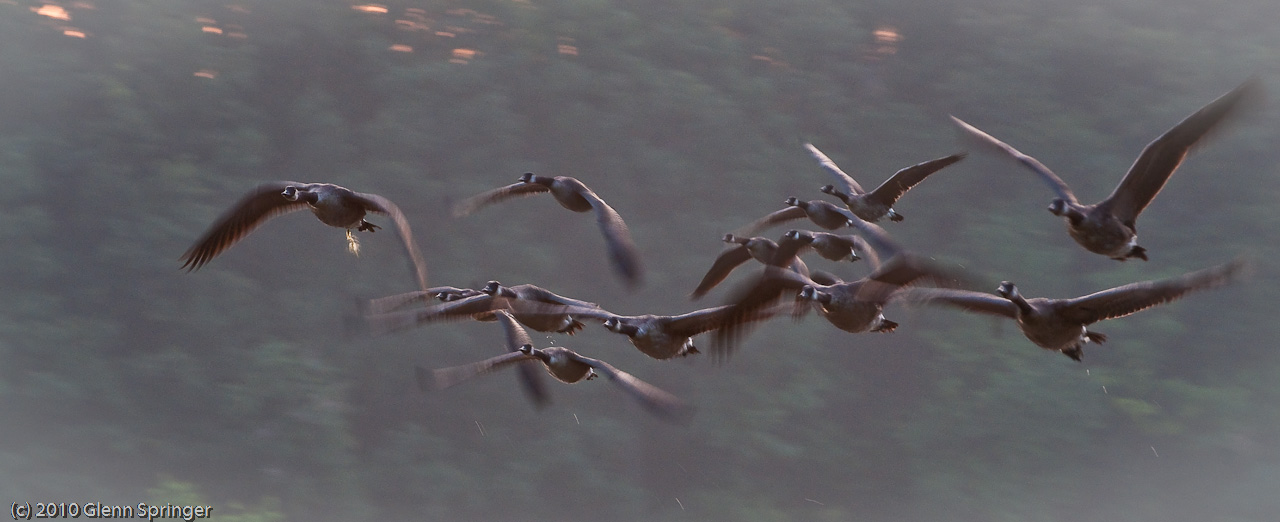
I'm sensing a pattern here. I was able to get some fairly good shots of birds sitting still, reasonably close, but nothing moving and far away (the flock of geese was a lucky accident). Maybe long lenses are not for reaching out and touching from a distance, maybe they're about filling the frame from closer up...

I put a couple of dozen shots up on my Smugmug page (click here). Some of them were Richard Martin-type shots of thistles and flowers, which I do better than birds! That's all I got out of 300 exposures...


Wednesday, July 28, 2010

Everyone has a Dream

Twice in one day! I didn't know I could blog twice in one day! It's been years since... never mind.

I did get out to shoot some different pictures on Sunday so I thought I'd share some of them here. We'll get to the meaning behind the title of this Blog in a minute, but first this story...

Frantic Biker

If you ever see a motorcyclist by the side of the road tearing his clothes off, and you're not a biker, you wouldn't understand. However if you ride you would get it instantly. I was riding back from the Whitewater Preserve on Saturday, took a detour down a nice dirt road and came out on Highway 35 just below Carnarvon. I felt a sharp pain, but just a little one on my back below my left shoulder blade. Sort of like a sharp itch. I was a couple of minutes from home so I figured I'd wait it out.

Just as I turned off on Red Umbrella Road, another one. This one was more intense: no mistaking it this time — I had a wasp in my jacket. I IMMEDIATELY parked, jumped off the bike and started to take off my jacket, but my gloves were in the way so they had to go first. Then the jacket, then it stung me again! I couldn't get my shirt off with the helmet on, so that took a minute which felt more like an hour, then I ripped the shirt off and saw a telltale black and yellow mote fly away out the corner of my eye.

I've been stung while riding a few times before. Once multiple times on my abdomen — I undressed in a church parking lot in the Elk National Forest in Pennsylvania that time and reduced the little bugger to a smear of yellow paste under foot. He might have stung me, but he was dead, dead, dead. Another was a single bee sting just below my collarbone (I actually dropped the bike that time, but that's another story) and once above my eyebrow when one got in my helmet.

For motorcyclists, there's an old saw: "if you've never dropped your bike, you will". Change that to "if you've never been stung while riding, you will be". You won't be a real biker until that happens.

That's my story, and I'm sticking to it.

So after getting dressed again, the pain being tolerable and reducing to a simple annoying itch (which persists even now, 3 days later. I can't reach the spot to scratch, so you'll find me rubbing up against doorframes and trees like a mangy bear), I decided to drop in on my neighbour, Vic. He comes walking by from time to time, and often stops in for a chat and a coffee. He lives a little ways down Pleasant Point Road, which is a dirt road just off Red Umbrella, and although I've been past his place, I never seemed to be there when he was, and wasn't sure which was his property. A couple of days ago I verified his "911" number (they've replaced all the lot numbers with a real address), and I knew he was there so I had told him I would drop in.

Dream Home

Vic is a former pharmaceutical executive, retired, and he bought his property with just a couple of rundown structures on it 20 years ago. He has spent that time building a dream estate, which you can't really tell from the road. When I grow up, I want a place like Vic's. It'll never happen — short of a lottery win — and for another reason: this man does magic with wood, and can turn his vision into reality. I got the $5 tour (I would have said 5¢ tour, but not in this place!). VIC DESIGNED AND BUILT THIS HOUSE HIMSELF (well he used trades, but it's entirely his concept and most of the woodwork is his).

I told Vic that I would take some pictures of his place. He graciously agreed to let me. He wasn't home on Monday evening, so I only got some outdoor late day shots, but I'll be coming back to do more. Especially interior shots looking out at a spectacular sunset from his outstanding open living room. Watch this space. If he lets me, I might even do a Blurb book for him.

Here are a couple of images for now: there are more on Smugmug. Outstanding.


View of the house from the lakeside. I was about halfway between the dock and the house for this shot. It's a multi-image HDR, gently treated just to bring out the texture of the wood and the dappling of the setting sun. The living room I mentioned is the cathedral-ceiling'ed area to the left, there's more house hidden behind the trees! Click on the picture. It's worth looking at full-screen size.


This is the "gazebo" he built at the water's edge. You have to go inside it to see the flawless design and construction, the warmth of the golden pine and oak he used, the massive posts and beams. Again this is an HDR shot, somewhat 'spicified' using Topaz Adjust 4 to bring out the textures. Again, click on it to appreciate the detail of the image.


To the right of the gazebo, facing the lake, is this spot. If you look further to the right, there's a hemlock grove populated by hundred year old trees. The pine tree on the left in this image leans out over the water and Vic tells me it is about 200 years old and is called "Lone Pine". This point of land was named after this massive tree a hundred years ago.

And as you may have guessed, this is yet another HDR treated shot, with a whole bunch more technical work, like a gradient map across the bottom and some levels work to bring out the texture in the pine tree. I wanted to show the detail of the forest floor as well as the sunset colours. Perhaps I got a wee tad carried away, but I like it!

More to come of this outstanding estate. I wish one day I could have one like it! {sigh}.

.

PHO–TO–GEN–IC (fəʊtəˈdÊ’É›nɪk)

"A photogenic subject (generally a person) is a subject that usually appears physically attractive or striking in photographs". Another definition is, "Attractive as a subject for photography".

So can an event or a venue be termed "photogenic", or is that term reserved for models with high cheekbones and symmetrical features? I'll leave the semantics to you.

I think that Whitewater Kayaking is a photogenic subject. It has everything: fast-flowing water which you can smooth out with a large f/stop and slow shutter speed or stop in mid-air with a big opening combined with a high ISO and resulting fast shutter; bright colours because the kayakers favour psychedelic paint on their boats and gear; incredible physical action and skill which can be captured in pixels; and a gamut of emotions from "the thrill of victory to the agony of defeat".

Last weekend was a fun event at the Minden Wildwater Preserve, continuing this week with the Canadian National Championships. I took a bunch of pictures, but tried a few different things so that I didn't simply duplicate the shots from last year's event (last year I focused on faces. I have a two-page spread in my "Pathways" book just of competitors' faces). This year I played with motion, colour and perspective. I got a few good images.


And now a video (if this works) for your viewing pleasure!


The first picture was one of a series in a burst of about 5 images i took at high speed (the D300 will do 6 frames/second without the external battery pack).

The second shot was taken during a race event called a "Boatercross" where half a dozen boats came over the dam simultaneously with a goal to be first at the bottom. A wild and crazy event.

Next is an image taken with the 400mm lens. I love the long distance perspective.

Fourth is a lucky shot. I slowed the shutter down to 1/6 second and panned with the boat. The wild water movement, and the brightly coloured boats in the background were even further enhanced by using the Topaz Adjust 4 filter "Spicify", not once but twice!

I came back today without my main camera, then got the idea that I could shoot video with my little Nikon Coolpix, so I tried it out. What do you think?

Unusual for me, I shot 430 images on Saturday afternoon. I brought them back here, uploaded them to the computer and processed them in Lightroom. First pass was a quick "keep it or toss it out"decision, and 90 images bit the dust. Then I went through and marked the ones I wanted to work on with a coloured flag and stars. As I write this, I've only gotten around to looking at the 3-star and up images!

By the way, there were lots of photographers there: this guy was set up across the river and I think was working for the organizers. I thought I got a good picture of him. He had set up a couple of strobes on tripods at the side of the river and was triggering them remotely with the transmitter on top of the camera. If it had been a Nikon, I would have tried to mess with him by selecting the same Commander channel, but alas, he was stuck with Canon gear.


Check out my Smugmug site for more pictures.

Adios!

Thursday, July 22, 2010

I Love Thunderstorms!

I feel sorry for people who grew up afraid of thunderstorms.We had a country place just North of Ste. Agathe, Quebec. I grew up in Montreal. We called them "country places". "Cottage" was reserved for a two-storey house in the city. Not like Torontonians who go away to the "cottage in Muskoka or the Kawarthas". There's an urban legend about a transplanted Montreal kid (I swear it was my daughter!) who said to her parents one day, "one day I'm going to see this fabulous resort called "The Cottage" that everyone goes to"!

Anyway, our house was up on the hill, across the road from the lake. My grandparents owned "the big house" which was on the water. It was a lonely spot, only 5 or 6 families on the whole big bay (Lake Manitou, we called it "Ivry" for some reason), and the property declined over the years until it was sold for a song many years ago. Of course it's now worth millions, and the whole lake is filled with "cottagers" and people who have retired. Torontonians: can you imagine — 500 or 600 feet of pristine shoreline on a clear, unpolluted lake only 45 minutes from the city?

Back to thunderstorms. My mom used to take us kids into the centre of the living room during a storm. She'd even take the bobby pins out of my sister's hair, I'm told, because she was afraid we'd get hit by lightning. Didn't rub off on us, though — a thunderstorm was a time we'd sit huddled in blankets and play games, having a great time!

A little older, I remember watching the storms through the picture window in the living room as they would track across the lake. The advantage of living up on the hill was, of course, the great view! I remember being in my grandparents' sun porch — it ran the full length of the lake side of the house and was screened in — you know what I remember most about being in there during a storm? That special smell of the rain through the screens. Every time I smell that smell, I go back to those idyllic childhood days.

I love thunderstorms. I was hit by lightning one time, while operating a Ham radio station on a "Field Day" at the top of Covey Hill sourh of Montreal. Blown through the wall of the tent. I have no lasting effects (right, don't say it!) and it didn't make me afraid. Later, I used to go to our garage in our "cottage" (two-storey house!) in Unionville and open the door and sit in a lawn chair protected from the rain except for the splashes that came in, and watch the storm.

Yesterday, we had a storm here. I grabbed an umbrella and went out to the gazebo in front of the house and just enjoyed the cataracts of  rain and the occasional thunderbolt. There was a smattering of small hail, and the sound of hail and rain on the canvas top of the gazebo was overwhelmingly beautiful. One lightning bolt hit somewhere out on the lake, couldn't have been more than 500m from where I was with an earsplitting blast of sound. Only one — too bad. I didn't have my camera with me because first of all, the gazebo is screened in and second I'm surrounded by trees so I couldn't get a great picture anyway. But I ran in the house as the storm slowly passed and took this photo out the doorway through the rain.


That's a closeup of the roof of my car.

I love thunderstorms.

Writing that took me back to great times growing up. I do have a photo somewhere of multiple lightning hits that I took out the window of our 15th floor apartment many years ago. It was a 35mm slide which I scanned, but I'll have to go find the DVD somewhere on which I stored it. I'll post it here when I do. If you have a picture like that, I'd be happy to share it, just send me an email and tell me where it is!

Last time I mentioned Intellicast. Here's an image I captured onscreen just after the storm passed.


but I went back in time to just when the storm was overhead. I'm right where that big orange and purple splotch is. I changed to look at the cloud view instead of the precipitation, and saw this screen:


http://www.intellicast.com/. It's very cool.

That "Revolver Map" spinning globe on the right

Looked very cool, but it doesn't do what I thought it did. I doesn't show you who HAS visited your site, it shows who's visiting the site RIGHT NOW. Yes, there's a counter at the top, but... so when I look at it, all I see is one visitor — me. And it has my location wrong, as "Markham, ON". Still, it's fun so I might leave it there for a while.

Enjoy your day!

Monday, July 19, 2010

Yippee, no HDR's!

For once, I didn't shoot any HDR's this weekend. I love the technique, and it's hard not to like the dramatic colours and precise lines, but there's a lot of it out there. Whenever I browse the NAPP site, it looks like every second picture is an HDR. Overdone. But fun.

Anyway, I went to the Haliburton Sportsman's Show for two reasons: OK, three. One, it was something to do, a good destination for a ride on a beautiful weekend (the WeatherNetwork was wrong: no rain at all until the middle of the night last night!).

Non-Photographic tip
There's a site called intellicast.com that has interactive weather maps online! You can see precipitation, cloud cover, all kinds of stuff and you can see it tracking across a map, or satellite picture. It's really cool. Check out the link, click the purple "full screen" box upper right, then click "play" to watch the weather move across the screen. It's almost realtime: the weather pattern is only 5 minutes old! As you can see, the rain has already passed here. Very cool site.

Two, my old hunting buddy Pete was delivering a lecture on how to keep whitetail deer on your property (Pete is the author/owner of Ripple Outdoors. He's a noted writer and photographer, specializing in fishing and hunting). I had a coffee and a catch-up with him.

And three, I read that Yamaha was going to be there with demo rides (my friend André from Humber who manages the motorcycle program for Yamaha was there) and with the Yamaha Rider Academy which gets 6- to 10 year old kids scooting around on motorcycles. Clinton, the owner of Canadian Motorcycle Training Services wasn't there, but Bob Island was, an interesting guy who is also a photographer and is the editor of Snowmobile Magazine. I figured, a good photo-op and I wasn't disappointed.


Reincarnation of Ricky Carmichael? Actually there was another kid there who also buzzed around fearlessly but was older. This little guy looks like about 6 years old! I might take some time to clean out the background on this shot.


Then there were these 3 little girls — sisters, I'm pretty sure — who lined up for a picture from their dad. I thought the 3 colourful helmets made an interesting shot: I called it "R-G-B" (if you're not into digital, you may not know the significance of that. Google it). I cheated, though. It was "R-Y-B" when I shot it. A quick fix in Photoshop and voîlà!


This Yamaha WaveRunner was scooting around on the lake. I knew the 400mm lens was good for something! I was going to crop it tight but thought the image might be more interesting composed like this.
There are more pictures from this weekend on my Smugmug site.

Photo Tip

My friend Pete writes and photographs for Ontario Out of Doors and other magazines. In the course of the conversation, he told me he could sell lots more pictures to them if he had taken the trouble to get MODEL RELEASES signed by recognizeable people in the pictures. He's right. And I've been lazy and don't have releases with me. You should always carry some in your camera bag. You never know when that super shot is going to come along!

I have one somewhere on the computer. I'll go find it, print up a handful of copies and stick them in my bag. If you want a copy, let me know (I think I said this before and never followed through: if I can't find the one I made a while ago, I'll make a new one. We need them)!

OK, I found it. If you want a copy of the modelrelease.docx file that I created and use, send me an email and I'll shoot it to you... Glenn
.

Thursday, July 15, 2010

Hi, I'm back!

Due to somewhat of a cascade effect, I haven't posted here in a while. When my dad was hospitalized and then passed away last month, a lot of the time I spent doing other things was, um, spent doing other things. That included work time, and creative time, and play time. A lot of that time became "family" time. So there was no time left to spend taking pictures, blogging, even riding my bike (I did 'force' myself to go out for a short ride from time to time. (how many times did the word 'time' appear in this paragraph? There will be a test at the end...).

I decided to simplify my blog postings. I plan to post reasonably frequently, make the posts shorter and the topics fewer. I'll post pictures, of course, because that's what this blog is about, and new techniques and tips to give you ideas, but I'll try to make them more succinct and organized. By skipping some of the fancy formatting and stuff, preparing a post should be more painless, and therefore somewhat more frequent.

A couple of years of doing this has not caused me to standardize the look and feel or even topic list since when I write it I generally write what I'm thinking at the time. Hopefully you will still continue to find it interesting and worth reading. Please feel free to pass the link on to others (http://www.faczen.blogspot.com/) and if you haven't already done so, please click on the "Follow" button over on the right so I can see how many people are following the blog. It doesn't mean you will get junk mail or have to check in all the time, it just helps me keep track.

Non-photographic tip of the day
This is an important one. Please read this.

My dad was meticulous, almost obsessive about maintaining his "Bible" which is what he called his 'just in case' binder. It contained instructions on what to do, who to contact, where to find things, in case he died. Without it, we would have been totally lost. However my sister and I are still struggling to do the things that we need to. There are a million of them and many of them are not obvious and were not listed in the "Bible". For example, what steps does one need to take to advise the various branches of government (motor vehicle bureau, health department, social security, and (God help us), Revenue Canada) that he's passed away?

Fortunately he took steps to ensure that all his financial vehicles — bank accounts, investments, etc — were in both his and my mother's names. Did you know, for instance, that Power of Attorney ends when the principal dies? Did you know that a bank will not accept a legal, notarized Power of Attorney unless it's written on the bank's own form? That the Motor Vehicle Bureau is giving us a hard time about transferring ownership of their car (jointly owned) into our mother's name so that it can be sold, without a signature from my father (which might be a little difficult to obtain)?

So. Here's my tip. If you don't have a will, MAKE ONE. If you don't have a set of Powers of Attorney (for health and for property), MAKE THEM. You need a lawyer for this and I know a good one — email me for the name. Prepare a DETAILED "What to do if I'm not around" binder and tell the people who matter where it is. Keep it up to date. Make it complete.


Now some photo stuff.

As I said, I haven't done much in the last month. But there are a few pictures, and it's worth visiting my July Smugmug gallery.

I've become somewhat enamoured with HDR techniques. Some things work, some don't. I said before that Photomatix Pro is the defacto standard, but Photoshop CS5 has awesome HDR capability and I've been using that first. If I'm not satisfied with the results, THEN I'll go to Photomatix. Hasn't happened much... anyway, here are a few images to make you think.


Leafy Abstract At the Minden Wildwater Preserve. Slow shutter speed and camera motion.One of my better abstracts, I think. Watch for this image in the revised "Pathways" book.
Exploring While exploring a dirt trail in the woods west of Minden on the KLR, I stopped for some shots along the road. I wish I was a better rider, I'm still a bit nervous on this kind of surface. That's a pretty steep hill. HDR/Topaz treatment. Go to the smugmug site to see some images taken along this trail.

Wild Orchid Thai Restaurant and Antique Shop in Minden. The bright yellow truck screamed "do an HDR!" to me so I did. A 5-shot bracket and Topaz filtering resulted in this image.


The Minden River Cone Natalie owns the "River Cone" ice cream and takeout place in Minden. Their burgers and shakes are excellent, they have a wide variety of ice cream products. Be sure to drop in when you're in the area! The "Cartoony" effect is a result of some creative processing with Topaz Adjust. Blow up the picture to X3Large on SmugMug to see it better. The clouds were stripped in from another picture, as was Natalie in the window.


Cloudscape A mundane sky made spectacular through the magic of HDR. From my True North back yard. A beautiful day and these dramatic clouds made me run back in for the camera. It's a 5-shot HDR but the main effect comes from the Topaz Suite, "Spicify" filter.